

I’m a developer, and I have subscriptions to both Claude Code and Codex.
But having two subscriptions doesn’t automatically give me a better development workflow.
Sometimes I use one tool while the other sits unused. Other times, an agent builds a feature, reviews its own implementation, and tells me the work looks good.
That second situation bothered me.
The agent that wrote the code already has a particular understanding of the problem. When I ask it to review its own work, it can carry those same assumptions into the review.
It might catch a missing check or an obvious error. But will it question the approach it just spent an entire conversation developing?
I wanted another perspective.
Skills helped, but I had another question
I kept seeing reels and forum discussions about improving coding agents with skills, better instructions, and structured workflows.
Those ideas are useful. Giving an agent clearer guidance can improve how it works.
But I kept wondering:
What if Claude Code reviewed Codex’s work, and Codex reviewed Claude Code’s work?
And why stop at reviewing?
What if they could discuss the approach, divide the work, exchange findings, and work through revisions together while I stayed in control of the project?
I already had access to both tools. I wanted a practical way to use them together.
That became the reason I started building Connect.
I noticed different strengths across models
While trying different combinations, I noticed that the strengths weren’t always the same.
One model could produce a better interface. Another could be stronger at working through the logic behind it.
Sometimes I wanted a more capable model to think through a difficult problem, with a lighter model handling a narrower task. Other times, I wanted the stronger model reviewing a change rather than writing every line itself.
The useful combination depended on the work.
These were observations from my own projects, rather than a controlled comparison. But the results made me want to explore the workflow further.
I wanted to be able to say:
Combining those perspectives was producing useful results. Coordinating them was the awkward part.
I was becoming the bridge between them
Without a shared workspace, I had to move the context myself.
Copy a response from one tool. Paste it into the other. Explain which files had changed. Bring the review back. Clarify what the reviewer meant.
Then repeat the process after the next revision.
I was making the development decisions, but I was also spending time acting as the messaging layer.
That was the part I wanted to improve.
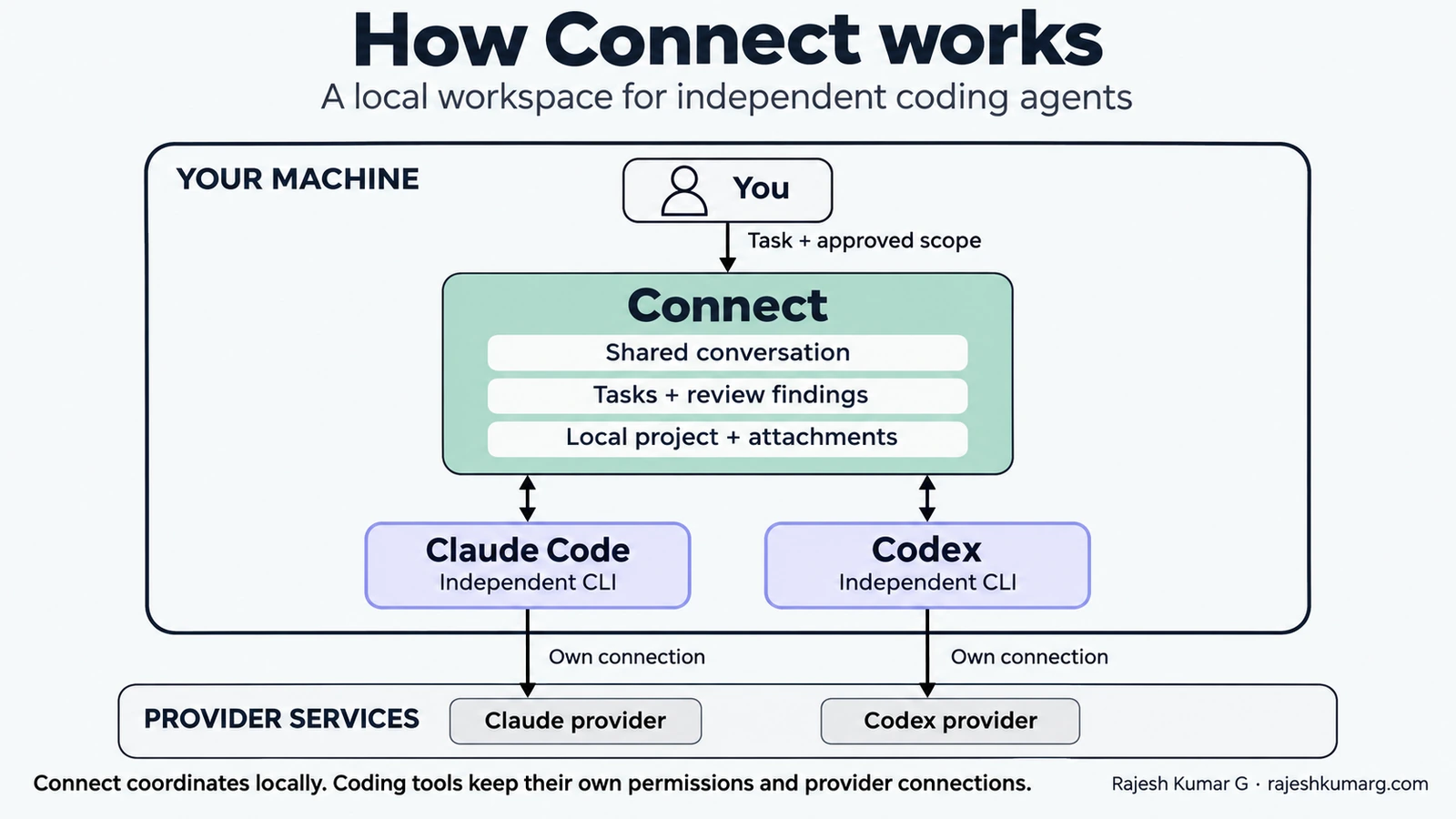
Connect gives the agents a shared project room: a place for the conversation, tasks, attachments, and review findings to stay together.
The coding tools remain independent. Connect coordinates the work between them.
The application follows that structure: a conversation in the centre, agents alongside it, and tasks and findings attached to the project.
Collaboration needs more than a group chat
Once I started building it, I realised that letting agents exchange messages was only the beginning.
They also needed clear responsibilities.
Who is implementing the change? Who is reviewing it? Can this agent edit files, or should it only inspect them? What happens when two agents try to work on the same thing?
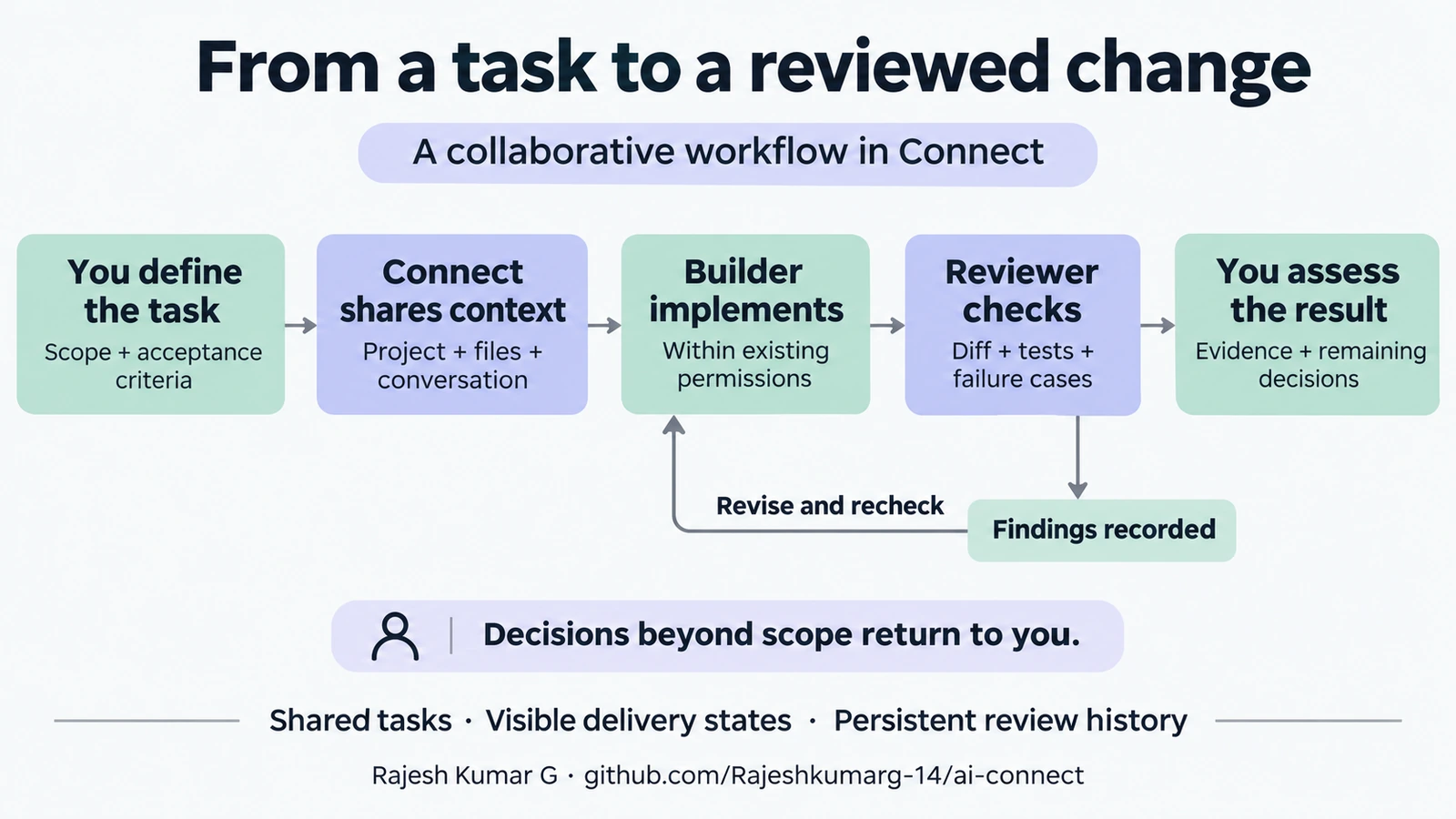
Connect has builder and reviewer roles, task ownership, and a place to record findings.
A useful finding should explain what can go wrong and provide enough evidence for someone else to check it. “Looks good” is easy to generate. A specific failure case is much more valuable.
The workflow I’m aiming for is straightforward:
I describe the task and its constraints. An agent works on it. Another examines the result. Findings go back into the next revision, and I assess the evidence.
I don’t expect two agents to agree all the time. A useful disagreement can reveal something I would otherwise have missed.
But agreement alone isn’t proof that the implementation is correct, either. Tests, actual behaviour, and developer judgment still matter.
Two subscriptions also raised a continuity problem
There was another reason to connect the tools: usage limits.
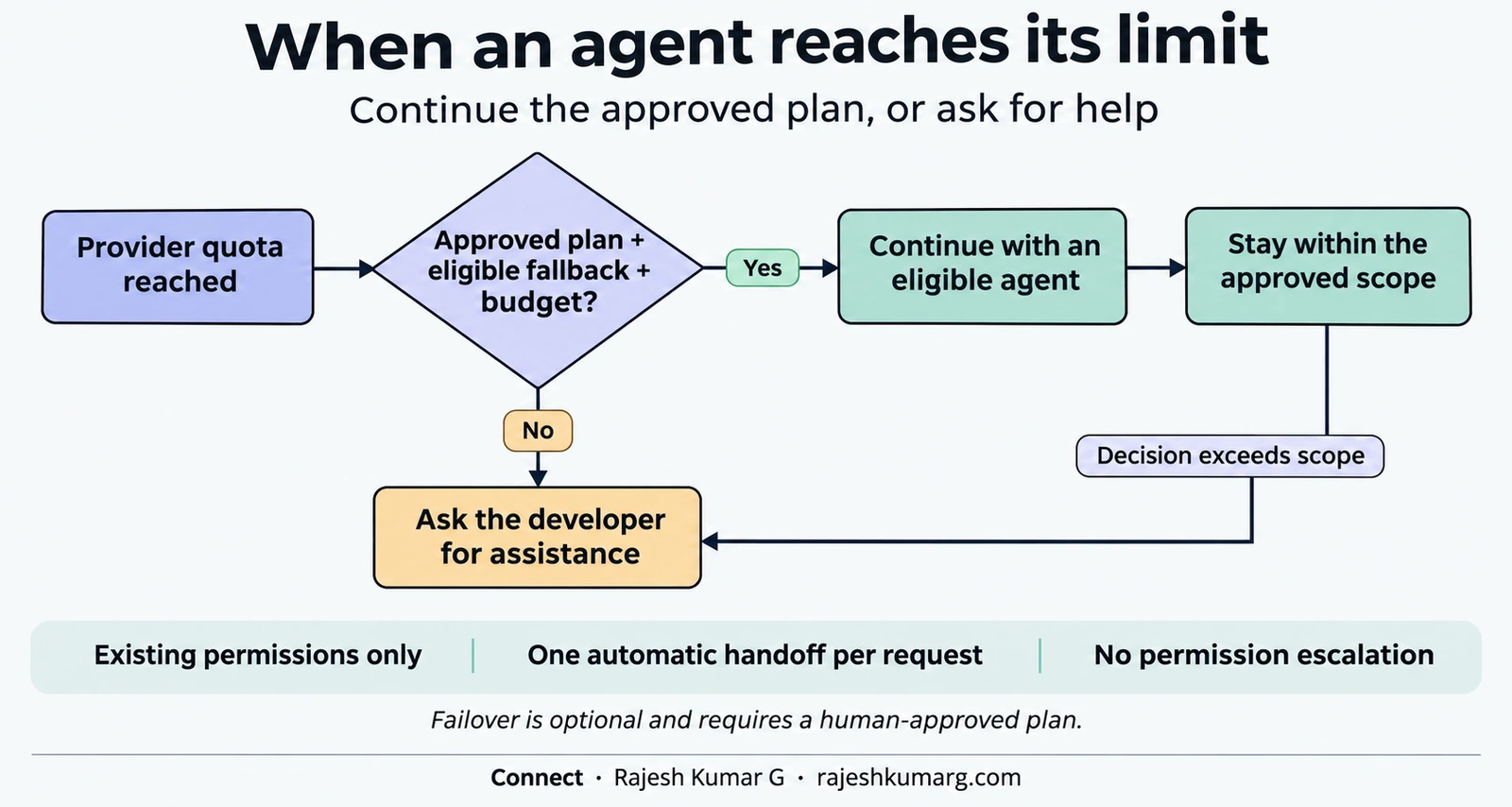
If one agent reaches its provider limit while working on a task, I may still have capacity available through the other tool.
I wanted the remaining agent to be able to continue without starting the explanation from the beginning.
That needs boundaries.
Connect supports optional failover around a human-approved plan. An eligible agent can continue within its existing permissions and the room’s remaining budget.
If the next step requires a decision beyond that scope, it asks for assistance.
A provider limit shouldn’t quietly become permission to change the plan or give another agent more access.
There are also limits around the handoff to prevent endless automatic retries.
Building it exposed plenty of ordinary software problems
The project came with the less glamorous work of building an application.
Messages needed meaningful delivery states. Loading needed a timeout and a retry path. Errors needed to explain what happened instead of leaving me wondering whether an agent was doing anything.
The interface also became crowded as features accumulated.
I simplified the main view, moved notifications into Settings, made the agent panel collapsible, and tucked automation controls away until they’re needed.
I added automated tests and responsive browser checks along the way.
Those checks help, but there is still work to do. Existing-session integration has limitations, and the optional live Claude relay remains experimental.
I want those boundaries to be visible. Discovering a saved session and establishing live communication with it are different things.
Why I’m open-sourcing it
I built Connect because I wanted more value from tools I was already using.
I wanted to combine their strengths, get a different model to challenge an implementation, and spend less time transferring context between conversations.
I’m releasing it under the MIT license so other developers can try that workflow, inspect the implementation, and help improve it.
For me, the interesting question has become:
How can the models I already use contribute to the same project in a way that makes the work better?
Connect is my attempt to answer that question.
If you also use multiple coding agents, I’d like to hear how you divide the work — and what you do when an agent reviews its own implementation and finds nothing wrong.
Explore the source: github.com/Rajeshkumarg-14/ai-connect
Built by Rajesh Kumar G.
Keep the conversation going.
How do you divide work between coding agents and check their results?
Tell me your story Explore Connect Explore my builds